You never know when you may need it and if you think your Windows 10 recovery USB disk may save you, you're wrong.
Had a slow day today at work and on my break, I figured I'd restore a perfected disk image backup and update it with several outstanding items. Restored the disk image, booted up and "Bootable device has not been detected" was on my screen for the first time ever.
"Whatever, I'll just insert my Windows 7/10-based USB restore drive and try the restore again." Hit F10 at bootup and the same message. After several reboots and BIOS setting changes, I couldn't for the life of me get my main M.2 drive or USB disk image drive to boot into absolutely anything.
It basically took clearing out the secure boot option in the BIOS to factory default, downloading Windows 11 installation media to a separate USB drive and the drives were finally seen. The installation media "repaired" the Windows 11 install and I was finally able to boot into Windows at the restored state that I'd set it to.
So what happened? A few things...
When finally booting into Windows 11 after "repairing it" from a Windows 11 installation disk, I couldn't log in via my "Windows Hello PIN", so I'm guessing the BIOS of my PC had been talking to each other and something got reset somewhere. I logged into Windows via my password and was able to work as normal 'til the end of the workday.
At that point, I wanted to challenge the situation and try another restore from my backup image. It worked, but we were back at the "Windows Hello PIN" issue again--that's fine--just have to reset it, and I presume it had something to do with clearing the secure boot BIOS setting.
What kind of blew my mind is why I couldn't boot into any USB devices except for a Windows 11 installation disk. My guess is that the USB restore disk I had on hand was the old Windows 10 recovery media which pretty much boots you right into the disk image restore process and Windows 11 requires the entire recovery environment shown below. (I do the "See more recovery options" option and do a disk image recovery.)
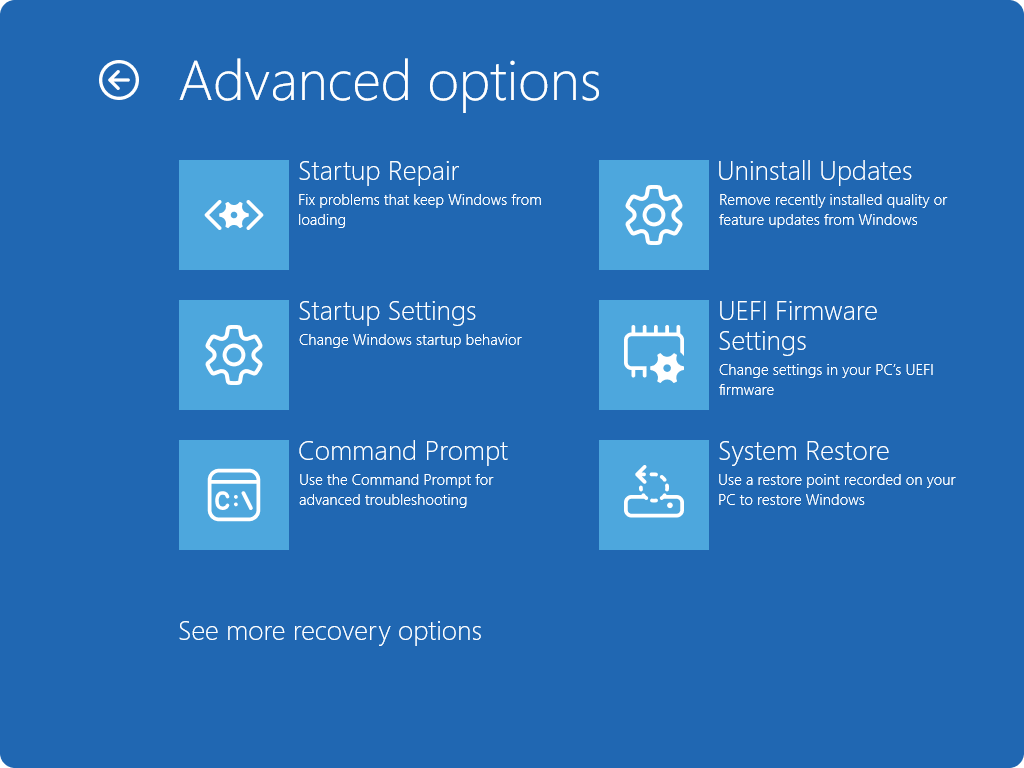
I'm literally in the process of creating a Windows 11 USB recovery drive as I write this and it's pretty much taking forever. It requires a USB drive over 16GB, which my handy Windows 10 USB restoration drive is slightly under, so I had to break out a USB drive with more space and recreate it with the Windows 11 version.
My guess is that the source of the problem with all of this was that 1) something happened with the BIOS secure boot relationship with my M.2 drive in a Windows 11 update and when I went to restore Windows to a version prior to the update, it wasn't having it. When I went to restore back to a previous Windows 11 version, it didn't recognize it and said, "nope!".
The second part of it was that my recovery USB drive wasn't Windows 11 compatible whereas I'm guessing the latest update won't accept anything other than a full-blown recovery environment.
My guess is that having this version of a recovery disk should bail me out next time. 'Guess we'll see!
Update: UNCHECK the box to backup system files for reinstallation. Cancelled the creation process, formatted the USB drive, unchecked that option and it took 5 seconds to create it. Formatted my original 16GB USB drive and it installed fine. Just don't do the "backup system files" option and you'll be fine.
Share To
About the Author

Currently a Lakewood Ranch, Florida resident, Philip has authored various interactive blog websites since the early 2000’s. Most content will be based primarily on matters of opinion as usual.





